Pocket Detection
Pocket Detection runs P2Rank on receptor structures and stores the predicted binding sites in the project. Open it from the left tool rail. The Receptors catalog supplies the structures to process, and the Binding Sites view shows the predictions for the receptor you are inspecting.
1. Choose receptors
The run uses the current receptor-table scope, including table filters and the global receptor selection. The Scope line in the tool shows how many receptors will be processed.
Exclude receptors with defined ligands is checked by default. It hides receptors whose import metadata already contains reference ligands. Clear this option to predict pockets for those receptors as well. If the resulting scope is empty, adjust this option or the filters in the Receptors catalog.
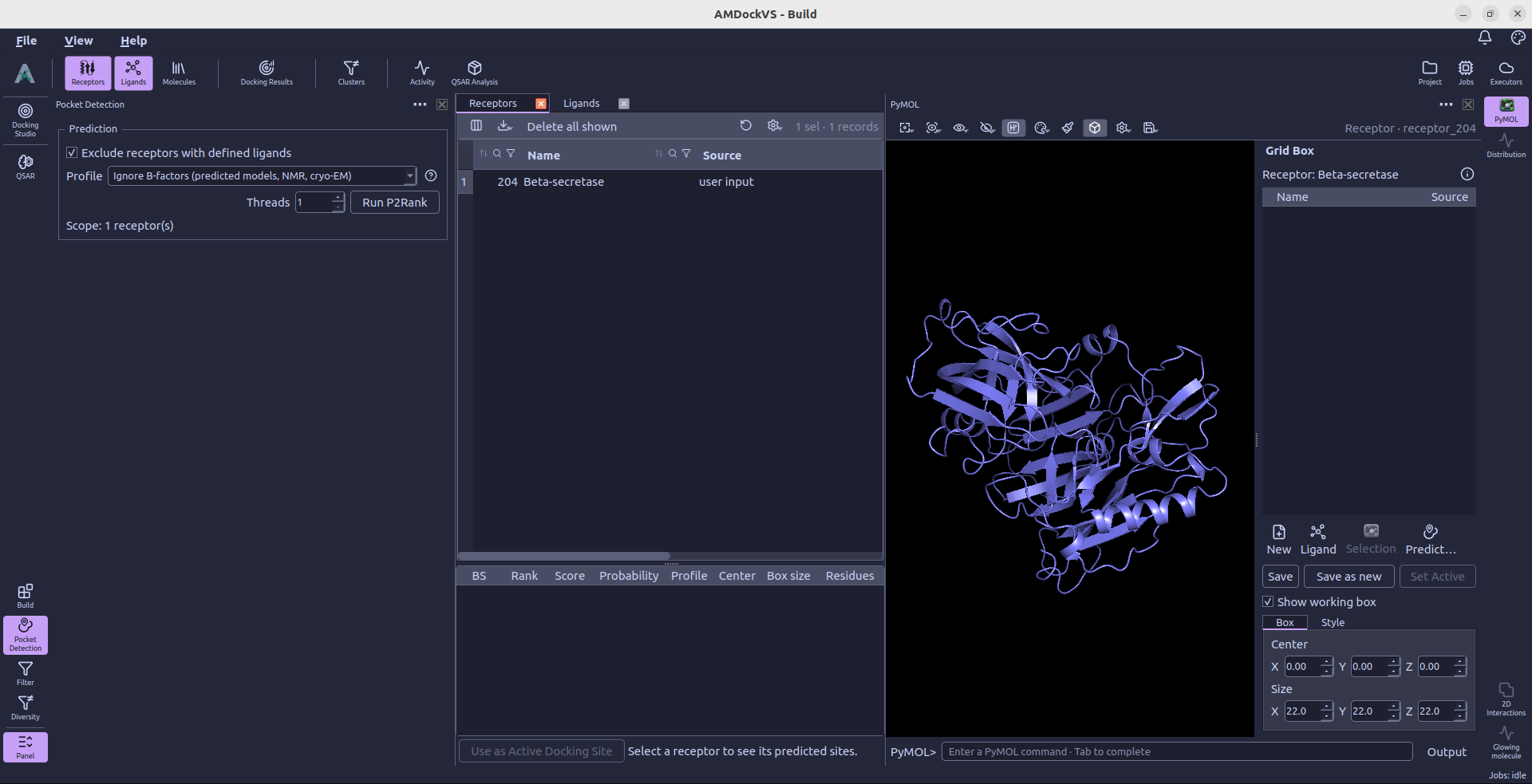
2. Set prediction options
- Profile — Choose Ignore B-factors (predicted models, NMR, cryo-EM) (the default) or Use B-factors (X-ray structures). The selected profile applies to the whole run, including runs containing a mixture of structure types.
- Threads — Set the number of CPU threads used by P2Rank.
Ignore B-factors (predicted models, NMR, cryo-EM) is AMDockVS's default. It uses P2Rank's AlphaFold prediction model, which keeps the chemical and geometric features but omits B-factors. Keep this option when B-factors are missing, uncertain, or contain prediction confidence scores. It also provides a fallback for mixed collections whose B-factor provenance is uncertain. P2Rank recommends this model for AlphaFold models and NMR or cryo-EM structures. For example, AlphaFold PDB files store pLDDT confidence scores in the B-factor field; these values have a different meaning from experimental X-ray B-factors.
The B-factor-free profile also uses its own score-to-probability calibration. Changing profiles can therefore change the predicted pockets, their ranking, scores, and probabilities for the same receptor coordinates.
Use B-factors (X-ray structures) uses P2Rank's standard prediction model, which combines chemical and geometric features of the protein surface with atomic B-factors. Choose this profile for X-ray crystal structures with meaningful experimental B-factors.
The differences between the two profiles are defined in P2Rank's Standard and AlphaFold configurations.
P2Rank and Java 17 or later must be available. When the runtime is missing, the P2Rank Runtime section reports its status and provides Open Settings to reach Settings → External tools.
Each run adds its pockets next to the earlier ones; a run with another profile does not replace them. The Profile column of the results table tells the runs apart, and the receptor's active docking site stays as it is until you choose another. Running the profile of a receptor's latest run again reuses those results instead of calculating them again.
3. Run P2Rank
Select Run P2Rank. While prediction is running, the status line reports progress and See details opens the Jobs monitor. The tool prevents another prediction run from being submitted while its current work is active.
When the job finishes, select a receptor in the Receptors catalog to inspect its predicted sites in the Binding Sites view.
4. Inspect predicted sites
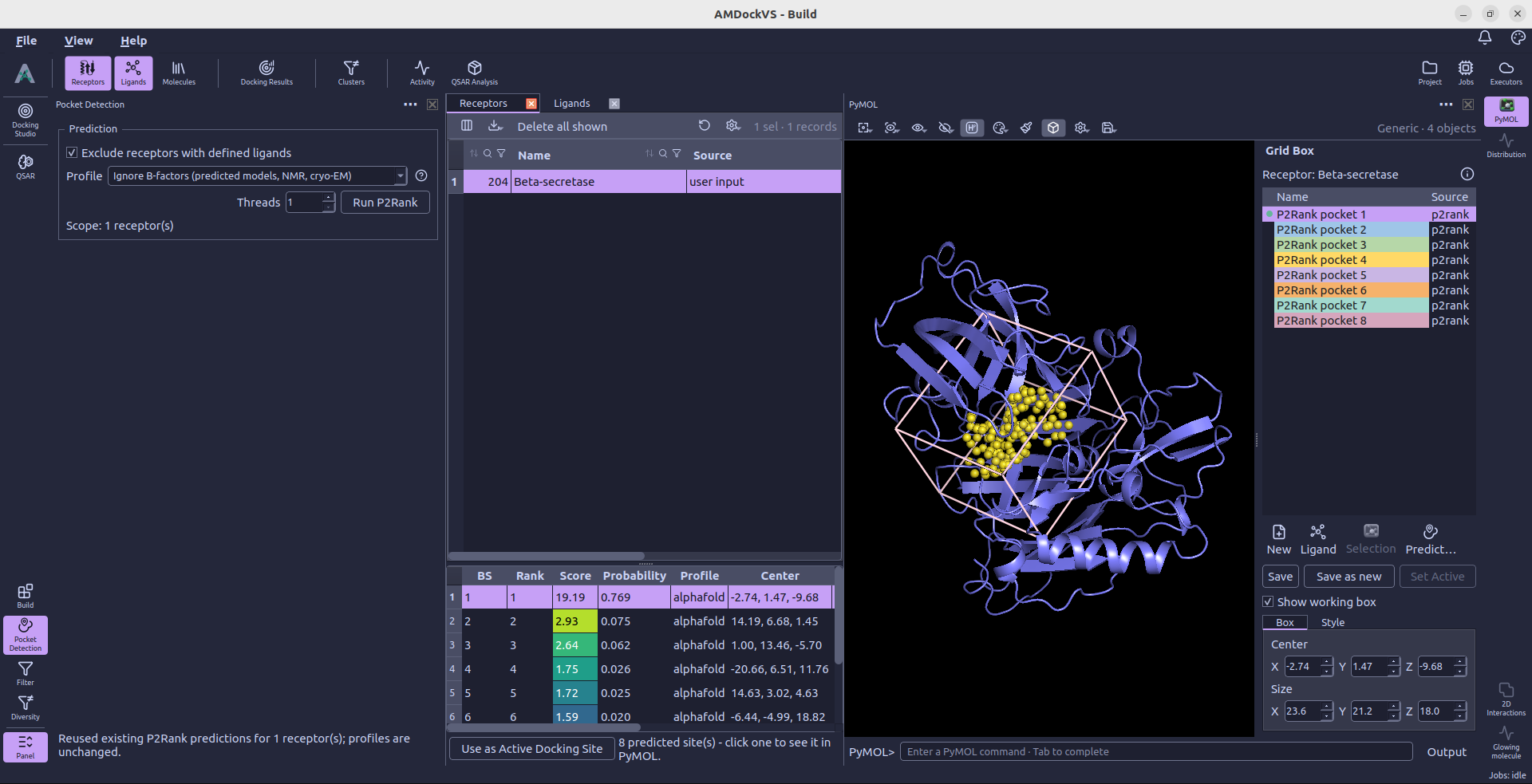
The results table lists the binding-site ID (BS), rank, score, probability, profile, box center, box size, and pocket residues. The Score cells use the same colors as the pockets in PyMOL: violet for lower scores and yellow for higher scores within that receptor's predictions.
Select one or more site rows to display their pocket points and centers on the receptor in PyMOL. The binding-site presets there let you switch between points, nearby residues, and a local surface.
5. Use a site for docking
Select the site you want and choose Use as Active Docking Site. This makes that site's box the active docking search space for the receptor. Selecting rows to visualize pockets does not activate them for docking by itself.
Review the box in PyMOL's Grid Box panel or in Docking Studio → Receptors, adjust it if needed, and prepare the receptor before launching docking.